Overview
NetSuite import is an essential tool for the implementation. There are many requirements that arise to choose the right field type and to import data to NetSuite in the applicable format. It’s unknown to users how to import multi-select. This document helps readers on how to import multi-select option during import.
Suitable for
- NetSuite Implementation Consultant
- NetSuite Administrators
- Data Import Users
How to import Multi-Select?
- Arranging the data such a way NetSuite reorganize
- The multi-select values should be in single-cell but can be separated with unique character, The pipe ( | ) is an ideal one and widely recommended to use in NetSuite.

- Once you are ready with the data, Save it in CSV (Comma Separated Value)
- Navigate to NetSuite standard import option which is located in Setup – Import / Export – Import Records
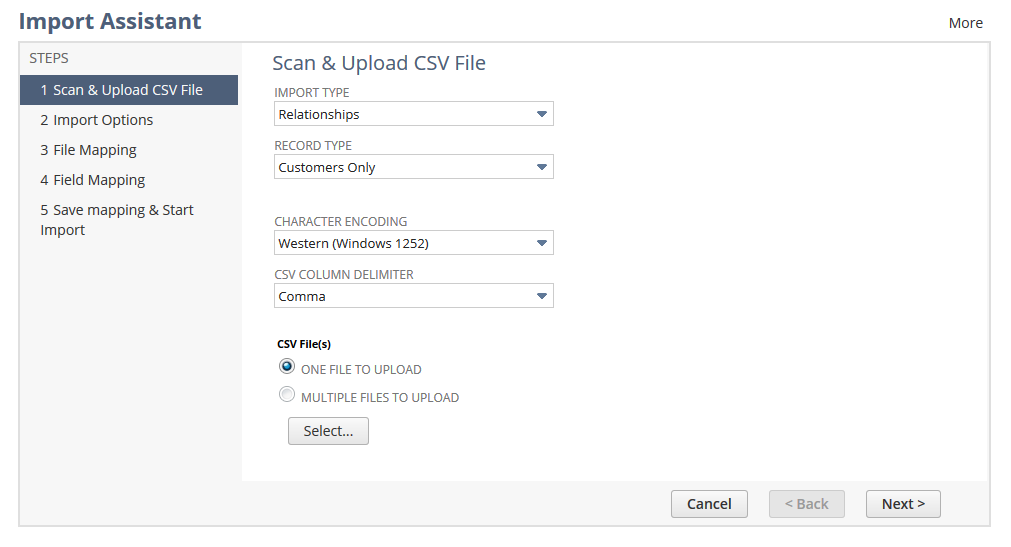
- Choose suitable Import type, Record Type and select your file and click Next
- In the Import Option, you can choose to require data handling option Add, Update , Add or Update and click expand Advance Option
- Make sure the pipe ( | ) selected in the CUSTOM MULTI-SELECT VALUE DELIMITER option and Click Next
- Map your excel fields corresponding to the correct field in NetSuite, Click Next
- Finally, Save and Run